Three different people sent me the same link this week, which is usually a decent signal that something is either genuinely interesting or being very well marketed. In this case I think it’s a bit of both.
The thing is called Jev, from a startup called TypeSafe AI. It went generally available on Sunday. In its first 24 hours on Vercel’s AI Gateway it was picked up by about 13% of their paying teams – faster than any model they’ve ever carried. Worth ten minutes of your time to understand what it is, and about the same again to understand what it isn’t. If you’re looking to get your hands dirty – you’re out of luck – as of Tuesday 22nd – TypeSafe AI isn’t taking on any more tire kickers.
What it actually does
Every AI model most of us have used in the last four years is, fundamentally, a writer. You ask it something, it writes you something back. That’s the interaction model and we’ve stopped noticing it.
Jev refuses to write anything at all. You hand it some raw material – an email, a support ticket, a log entry, a document – and you ask it a question where you’ve already listed the possible answers. Is this billing, technical or sales ? On a scale of routine to urgent, how bad is this ? Is this person angry, yes or no ?
It picks one. That’s the whole output. No explanation, no “certainly, I’d be happy to help”, no prose. Just the answer, plus a number telling you how confident it is.
“Think of Jev as a frontier-intelligence function call: unstructured state in, typed probabilistic decisions out.”
Diogo Almeida, TypeSafe AI
It’s the difference between asking a colleague to write you a report and asking them to just point at the right folder. And if you’ve ever actually looked at what software spends its time doing – pointing at the right folder is most of the job.
Why anyone is excited
Two reasons and they’re both unglamorous.
It’s fast. Answers come back in well under half a second. A chat model asked the same question takes seconds, because it’s busy composing sentences one word at a time before it gets round to the bit you wanted. Jev produces the whole answer in one go. Ask it five questions about the same document and it answers all five in roughly the time it takes to answer one – which turns out to matter a lot, and I’ll come back to that.
It’s cheap. Roughly four cents per million words in, and the output is free. That’s not a discount, it’s a different order of magnitude.
Put those together and a whole category of thing that was previously too expensive to bother with becomes trivial. Every decision point buried inside a piece of software – which queue does this go in, does a human need to see this, should we escalate, does this look dodgy – can now have a bit of judgement applied to it for essentially nothing. The model is named after William Stanley Jevons, the Victorian economist who noticed that when something gets cheaper we don’t save money, we just use far more of it (Jevon’s Paradox). They are not being subtle about the thesis.
The bit where I stop being impressed
TypeSafe’s homepage says Jev is 193 times faster and 444 times cheaper than the alternatives. Those are lab numbers – a single isolated decision, measured against a single call to a big expensive model, on test cases the company designed itself. To their credit they more or less admit this in their own materials.
The real world figures published so far are a lot more modest. A production document pipeline saw about six times faster. An independent test came in around five. And in the most honest datapoint of the lot, one of TypeSafe’s own employees swapped a single step of a live pipeline over to Jev and measured a 15.9% speed improvement and a 30% cost reduction.
Not 193 times. Fifteen point nine percent – because replacing one link in a chain doesn’t make the chain much shorter. Anyone who has ever done performance optimization knows this feeling.
For the record – 15.9% is a good result, and the honest range of three to thirty times faster is an excellent one. I’d have more confidence in the product if the marketing had more confidence in the actual numbers.
The other claim doing heavy lifting is that Jev “can’t hallucinate”. This is technically true and practically misleading. Because the answers are listed up front, it can’t invent a fourth option when you gave it three. What it absolutely can do is pick the wrong one of the three and tell you it’s 90% sure. That isn’t hallucination in the technical sense but it’ll ruin your afternoon in exactly the same way.
And that confidence score – the thing that’s supposed to make this trustworthy – is the part I’d test hardest. Someone ran an independent check on it. On standard public test sets, the confidence numbers were honest and well behaved. On a set of invented support tickets the model couldn’t possibly have seen before, they drifted badly, and in different directions depending on the type of question – overconfident when picking from a list, underconfident on yes/no. Useful, but you’d want to calibrate it against your own data before you build anything load bearing on top of it.
What I’d actually do with it
Assuming you’re building something, a few things worth knowing :
Break the hard question into several small ones. This is the genuinely interesting finding. On a single difficult judgement call, a decent small chat model beats Jev comfortably. Decompose the same judgement into five simple typed questions and Jev wins – it went from 62% to 95% on one phishing test while the chat model it was up against actually got slightly worse. That’s an unusual property and it changes how you’d design around it.
Don’t trust the confidence number out of the box. Test it on your data, per question type.
It’s a component, not a system. It replaces the decision, not the pipeline. See the 15.9%.
Price your own workload. One developer found it 10-20x more expensive than the alternatives for his particular shape of traffic. TypeSafe also say straight out that they can’t prove the price isn’t subsidised, which I appreciate them saying and would still plan around.
Today versus where this goes
Today it is good at sitting inside software and making small, fast, cheap, repetitive decisions that previously needed either a rigid rule or an expensive model. Sorting, routing, triage, flagging, screening, guarding an agent before it does something silly. It is not good at anything requiring explanation, nuance, or a question you didn’t anticipate. It can’t tell you why. And it runs only on TypeSafe’s servers – no published research, no model you can run yourself, no option to put it inside your own building. In my day job that last one is the end of the conversation, not the start of it, and I suspect that’s true for a lot of regulated industries.
Where this goes is the more interesting question. I don’t think the bet is that Jev gets smarter. The bet is that “AI model that returns a decision instead of an essay” becomes a standard shape that everybody offers – it doesn’t look especially hard for the big labs to copy, and open source versions are apparently already turning up within days of launch. If that happens, the lasting contribution here isn’t this particular model, it’s the idea.
This is directionally very encouraging – we’re burning tokens at an alarming rate and using a warehouse sized brain to answer trivial classification questions – remember early ChatBots trying to auto-complete math questions and failing – now they just reach for a Python CLI. Horses for courses.
Jev went GA on 21 September 2026. Everything above was accurate the day after, which in this field gives it a shelf life of about a fortnight.
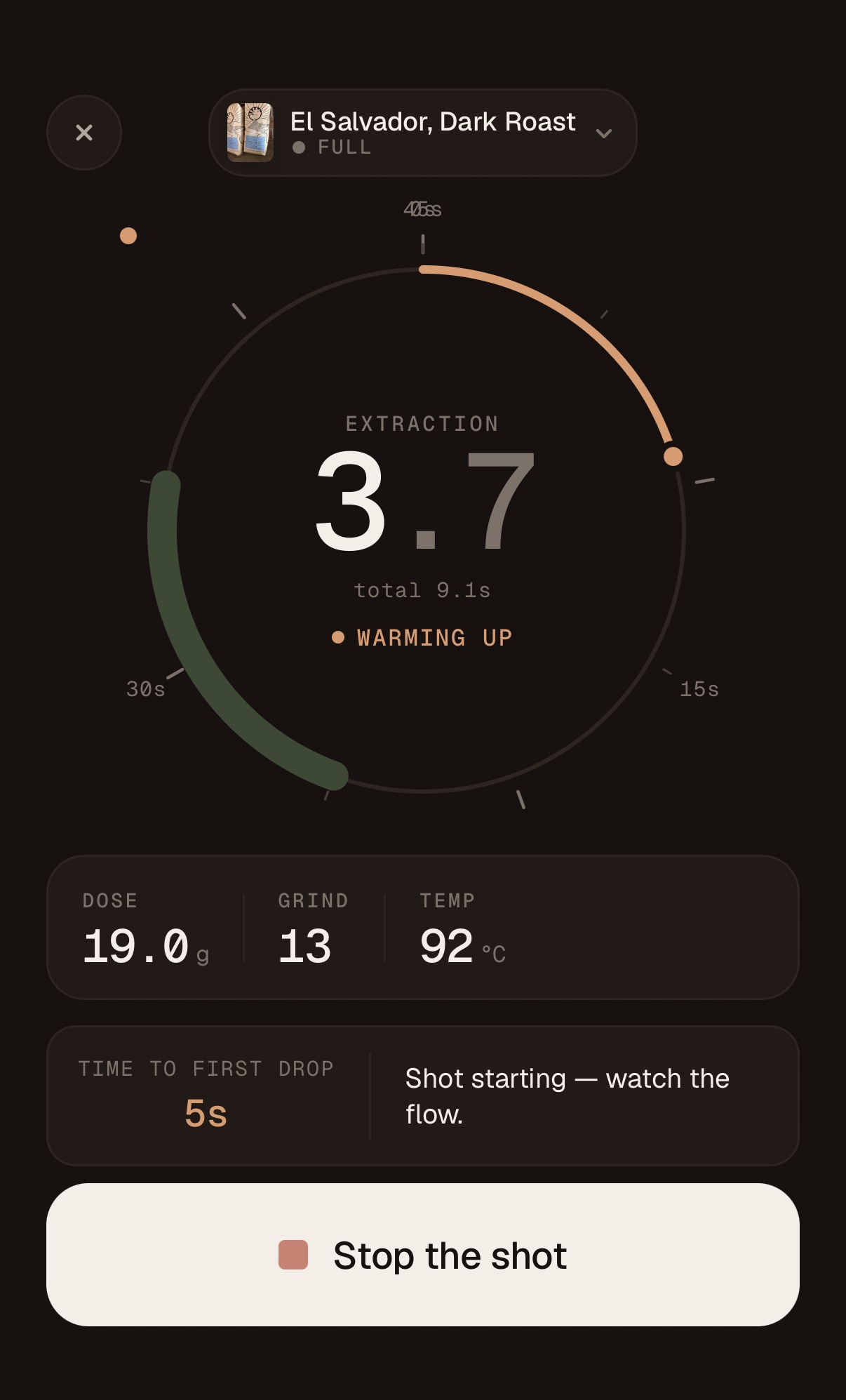
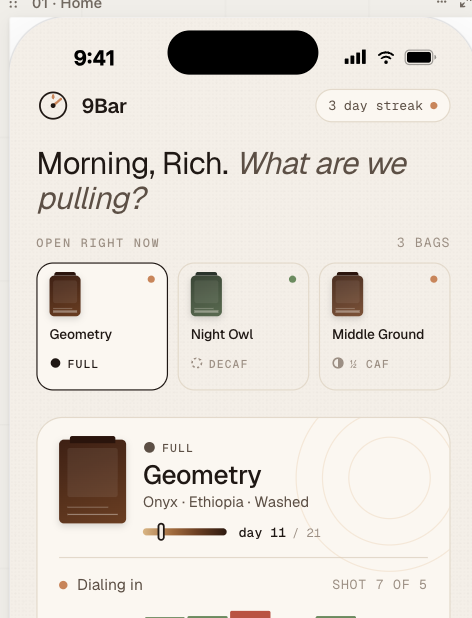
The next big feature is integrated the PullBook App with the Half Decent scale so I can completely automate the “pull a shot” workflow in the app but due to a shipping delay from Hong Kong all I have is a rough implementation and a simulator as shown below :
Status report – I gave the web site a bit of a makeover and improved the automation but nothing major. I also fixed a few minor bugs in the app and ended up in a bit of a merge hell. I have a branch open for the scales integration on one machine and working on bugs on another machine and at one point I just wanted the two Claudes to connect to each other and figure out how to move forward – relaying GitHub instructions through me was just slowing the whole process down and I don’t think I was adding much to the discussion. Anyway – everything got synched and committed and a new Apple TestFlight build is on its way.
I’m still manually onboarding beta participants – we’re talking small numbers so it’s entirely manageable but would love to automate this but away as well. My long term goal is to automate everything and reduce my role to design authority, product strategy, release planning / feature prioritization and any task that still needs a pair of hands to complete.
What this experiment has show me so far is :
I think my PM background and distance from the underlying tech is an advantage – there’s a strict division of labor between me (the what) and Claude (the how). I occasionally have to wade in with an opinion (usually in the form of a question) if I think the implementation may not be optimal. I’m equally open-minded and generally interested in Claude’s opinion of the what.
Everything is falling into place for self-improving / self-adapting software. Take the feedback, prioritize it, implement it, test it, ship it. Rinse and repeat. An external API changes or some other catastrophic bug – find it, fix it, ship the fix. All implemented with Claude in a local loop. There needs to be name for this.
At some point I need to invest a bit of time in automating the App store distribution – right now that’s very manual and requires XCode – my suspicion is that I will have to pay GitHub (for the OS/X images) or Apple – XCode Cloud and that would violate one of my requirements for this project that I don’t spend any money (beyond Anthropic tokens).
Reminder, if you are an Espresso aficionado, you might find the app very useful, more information here :
On these pages, I’m keeping notes of my experimentation with new AI based software development tools. My goal is to understand for myself whether tools like Claude and Codex are ready for developing commercial software. Low code and zero-code tools have been around for a decade or so – this is not the same. Vibe coding has been around for a few years as well – this isn’t the same.
This new approach has various names – agentic coding, spec driven development, personally I think “intent driven development” captures it best, though I’m confident that name won’t catch on. With intent driven development – I’m responsible for the what, the AI is responsible for the how.
As the cost and time to develop software shrinks, the focus will shift to other critical elements of the product lifecycle. I believe the next areas of differentiation for builder / product organizations will be:
Choosing hard problems to solve and solving them in ways that delight users. The easy problems can now be easily solved with a few well authored prompts and a vibe coding platform. Vibe Coding is incredible for solving small local problems – it’s the new Excel (and I mean that with a huge amount of respect)
Accelerating all the other toil related to building and product – pricing, training, marketing, enablement
Convincing enough people that your solution to the problem is the best. As time to market collapses, you have to assume competition and cheap imitation will be rife – how do you stand out ?
And so it is with my little pet project. I’ve invested 6.5 hours in the development of the application – included in that is some overhead in getting the development environment setup (GitHub automation, local Xcode), design, development and building regression test harnesses. For fun, I did a little costing analysis on the main code repo using scc – clearly COCOMO hasn’t really kept up with even pre-AI development tools but it’s a good way to reason about the magnitude in productivity – 8 months compressed to a week – even if the COCOMO estimate is out by a factor of 10 – the point still stands.
But that’s not really the point of this post. In my humble opinion, software development for low-stakes, greenfield problems are largely solved at this point and development time and cost is collapsing – it’s hard to debate this any longer and I personally don’t require any convincing. I don’t see an imminent plateau either – even if the models are throttled – agentic development can still scale in other ways. The way we develop software – heavily augmented with AI and human as the designer / orchestrator – that’s the way – there’s no going back.
So on to the next bottleneck – that’s pretty much everything upstream and downstream of software development. Software development is the tip of the spear in terms of agentic augmentation and performance improvement – everything else is next.
I spent a few frustrating hours this week downstream – fighting with the Apple TestFlight review process – clearly the user-centric design and detail to attention that Apple products are known for is pretty much absent from their developer tooling. I won’t belabor the point here but it’s classic “toil” – work that has to happen but brings you no joy at all. But it does highlight the point about the whole product lifecycle – everything has to get leaner and faster – it’s not going to be acceptable to wait three days for an App Store approval if the app only took a day or two to develop. You can’t spend a month on a marketing plan for a new release if the release will be out in two weeks. Everything has to speed up.
As part of the early access stage for my little test app – I needed an onboarding process. I could have used the Apple TestFlight defaults but want to own the onboarding and capture some user information in the process so I pretty much single-shotted a simple website (hosted on GitHub pages) and setup a Google form to capture registrations – not as automated as I’d hoped but mostly a one time cost.
Now I have the simple web presence – I have a home for the app’s change log so I got Claude to create an Action to create release notes every time I push a new release. The only twist here is that the Action calls out to Anthropic to turn PR text into human readable release notes – so far It seems to work well.
How we think about planning and project management will have to change. Even for a small one man project – normally there would be some planning involved but what I’ve learned this week is that if you have time to write a GitHub issue or a Jira ticket, then you probably have time to “do the thing” you were going to write the ticket about. What kind of planning is eve required in world of constant feature delivery – all you really need is direction / themes and prioritization.
The next thing I’m thinking about is how to take this experiment further – I have the first batch of beta users (you can sign up here if there are still slots available) and I expect to get some feedback – I’m hoping I can largely cut myself out of the loop. My goal is for Claude (or whatever) to present the work planned for the next release (new features, bug fixes, tech debt) based on customer feedback and product analytics – let me review it then just get on with the implementation, testing and delivery. Self improving software/ products / systems with human defined policy and guardrails – that’s where were heading. Sure someone still needs to inject strategy and innovation into the loop but product maintenance and improvement can be largely automated.
Three different people sent me the same link this week, which is usually a decent signal that something is either genuinely interesting or being very well marketed. In this case I think it’s a bit of both.
We wanted to end the trip on a big day and Wilson Mountain was our final choice after considering a few alternatives. Wilson is the highest point around Sedona and it does not let you get there cheaply – a long, steep hike, done on tired legs after four days of canyon walking. We started…
Two hours south to Sedona via the route 66 town of Williams for dinner and vintage Americana. My first time in Sedona – fairly largish tourist town full of crystal shops and Mexican restaurants and surrounded by some stunning landscape. A nice VRBO house up in the hills on the edge of town gave us…
FWIW – my day job is running a largish (28 people) Product and Design team for Cellebrite. Cellebrite has nothing to do with Espresso – though some of the offices do have decent machines. I’ve been leading product teams for over 20 years and that background is driving how I develop software with Claude. For new feature releases I batch several related features (and bugs) and build them into a sprint – the sprint happens in a single branch. Sprints are 1-3 hours – usually on a Sunday when things are quiet. For major features I use plan mode judiciously – I rarely single-shot anything. While I have no desire to look at code (actually one of my goals) – I do want to understand how the design (technical and UX) is evolving and what the underlying data model is. I also have a medium term roadmap of sorts – and when I’m in plan mode with Claude – I’m constantly reviewing decisions related to the current work that may impact things I need to do in the future. This week’s Sunday sprint was a good example of that.
What I actually wanted was a more convenient way to sync data across devices (iPad, iPhone) – currently there’s a hack in place to back up and restore data to iCloud – it works but it’s a temporary hack. To access iCloud APIs – the app needs access to iOS native APIs so what I ended up doing was pulling ahead with the native wrapper work. I’ve been avoiding this because It adds a whole lot of Yak shaving – setting up an Apple Developer subscription, installing XCode, wrapping the react app with Capacitor, not to mention potentially breaking the app. In the pre-agentic world this would’ve been months of prep and work – now it’s the kind of thing you can pull off on a Sunday evening while half watching TV with wifey. The first step was planning – the work that needs to be done, the risk and mitigations – a few tweaks to the plan and go. The major worry was breaking the barcode reader – one of my favorites – the mitigation was pretty much a rewrite of that code. While Claude was coding – I set up XCode and signed up for an Apple Developer account.
After some jangling around in XCode trying to figure out how to get the app on my phone (without having to go via the App Store – something for another day) and backtracking to get the app icons in the right place. That small magical icon appeared on my screen. My first iOS app !
Click – nothing. Well not nothing, but the rendering was broken – somehow the screen dimensions were not taken into account so the app was visible just zoomed in to a region of the canvas with nothing on it – quickly fixed and redeployed. Straight to the home screen – loaded my current config and data and looked like everything was working – except dark mode – what happened to dark mode ? Another debug session and quickly fixed and redeployed. From visual inspection – everything looked to be working – probably 90 minutes to wrap a reactive app with Capacitor and change to native calls.
The thing I actually wanted was iCloud synching – so I started a smaller sprint to get that working. I thought it would be smaller – a fair amount of debugging was required here and I’m starting to think Claude really isn’t quite expert level (yet) – it has the breadth maybe, depth I’m less sure. It took some debugging and some design iteration but we got there eventually. I don’t think an expert would make the kind of mistakes I experienced during this sprint and it’s disconcerting when Claude admits – “oh yeh, I should have realized that function would fail if we hadn’t initialized the XYZ first”. Early days I guess. At some point – I may run the repo against another coding agent and get a second opinion on some of the design choices.
So I now have a fully functioning iOS native app running on iPad and iPhone with iCloud synching across devices. I’ve also published the app through TestFlight so if you are interesting in trying it you can sign up here. Part of the publishing flow discovered that the 9Bar name was already taken so had to rename the app – that was a lot of changes. Next time Claude suggests a name – I’ll ask it to verify domain names, app stores, USPTO, etc. Trust but verify !The next significant enhancement is integration with the Half Decent Scale – this will be a real test for Claude – this involves controlling a remote device over BLE.
At the start of the year I re-started my home espresso obsession having grown dissatisfied with the declining quality of Nespresso pods. This isn’t my first foray into home espresso and I’ve owned a range of machines over the years. I bought my self the entry level but pretty dependable Breville BES840XL and a one shot burr grinder – the Viesimple Gen 4.
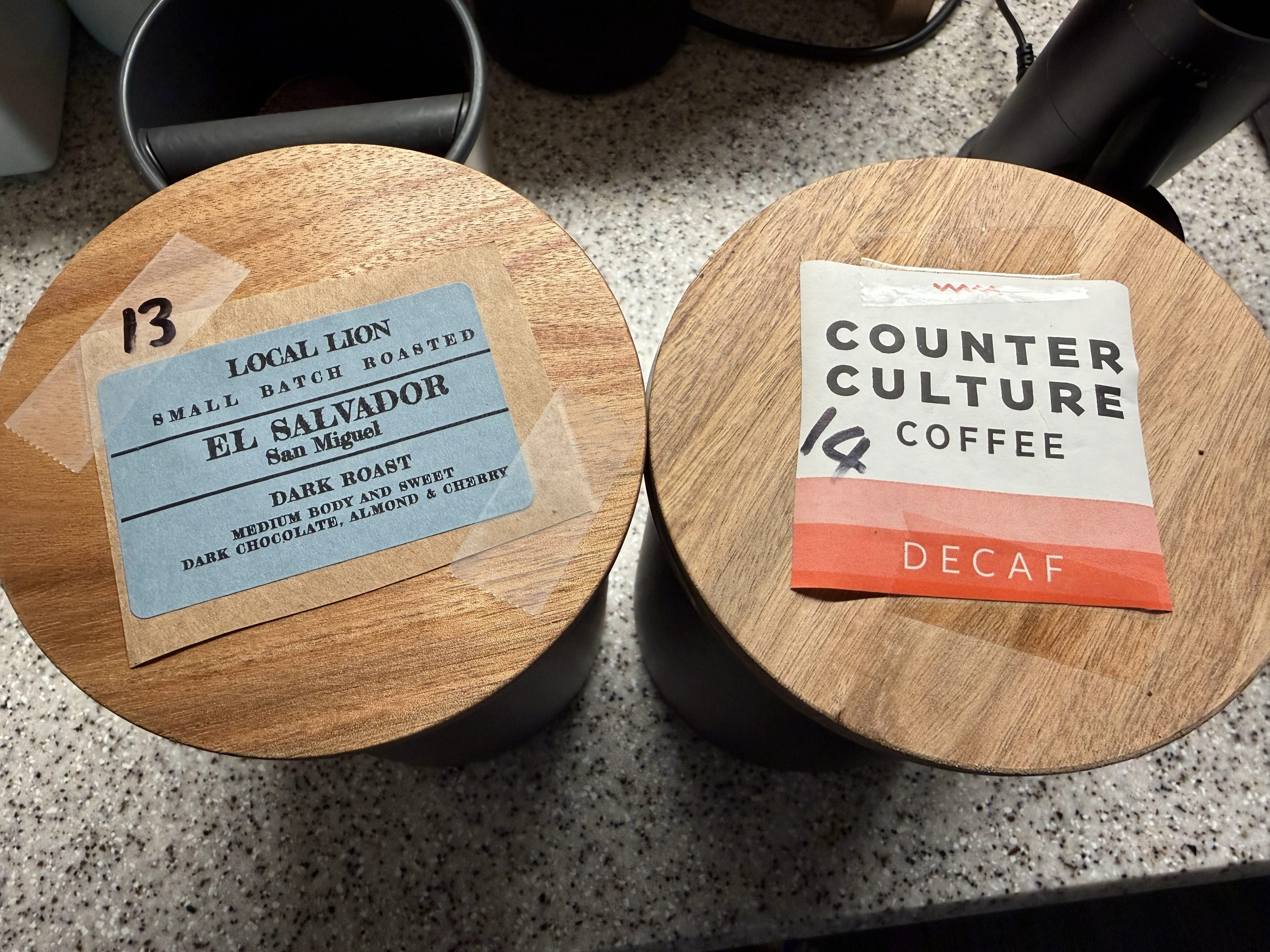
I have a couple of go-to beans from my local roaster (Counter Culture) but also like to try new roasts and usually pick up a bag or two when I travel. Every new bean takes a couple of shots to dial-in (grind, dose, pull duration, etc.) and I was keeping a log on Notes app, and scribbling the grind size on the label of the bean jar. A workable system but not ideal and not scalable.
About the same time, I was starting to play with LLM-based coding agents – Claude, GitHub Co-pilot, Codex, etc. and though it would be good to try a couple of real life software projects from ideation all the way through to delivery to get a sense of how the technology has evolved over the last couple of years. I learn best by doing.
So, over a rainy memorial day weekend I wrote a specification for a basic app to track my caffeine experimentation, used Claude Design to come up with mobile UX (iPhone and iPad) then brainstormed Claude Code on the best starter implementation and within a few hours and a few iterations – I had something working.
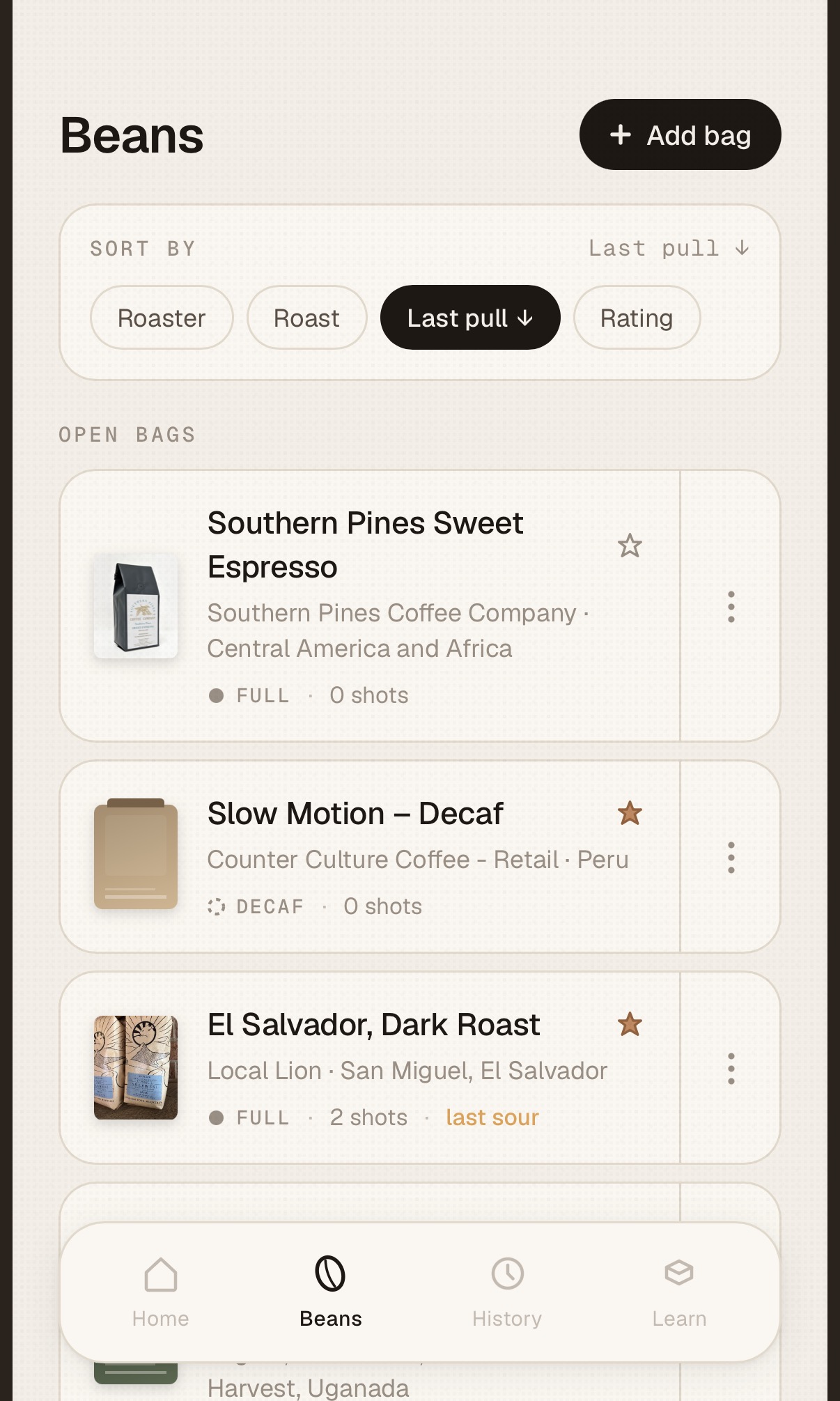
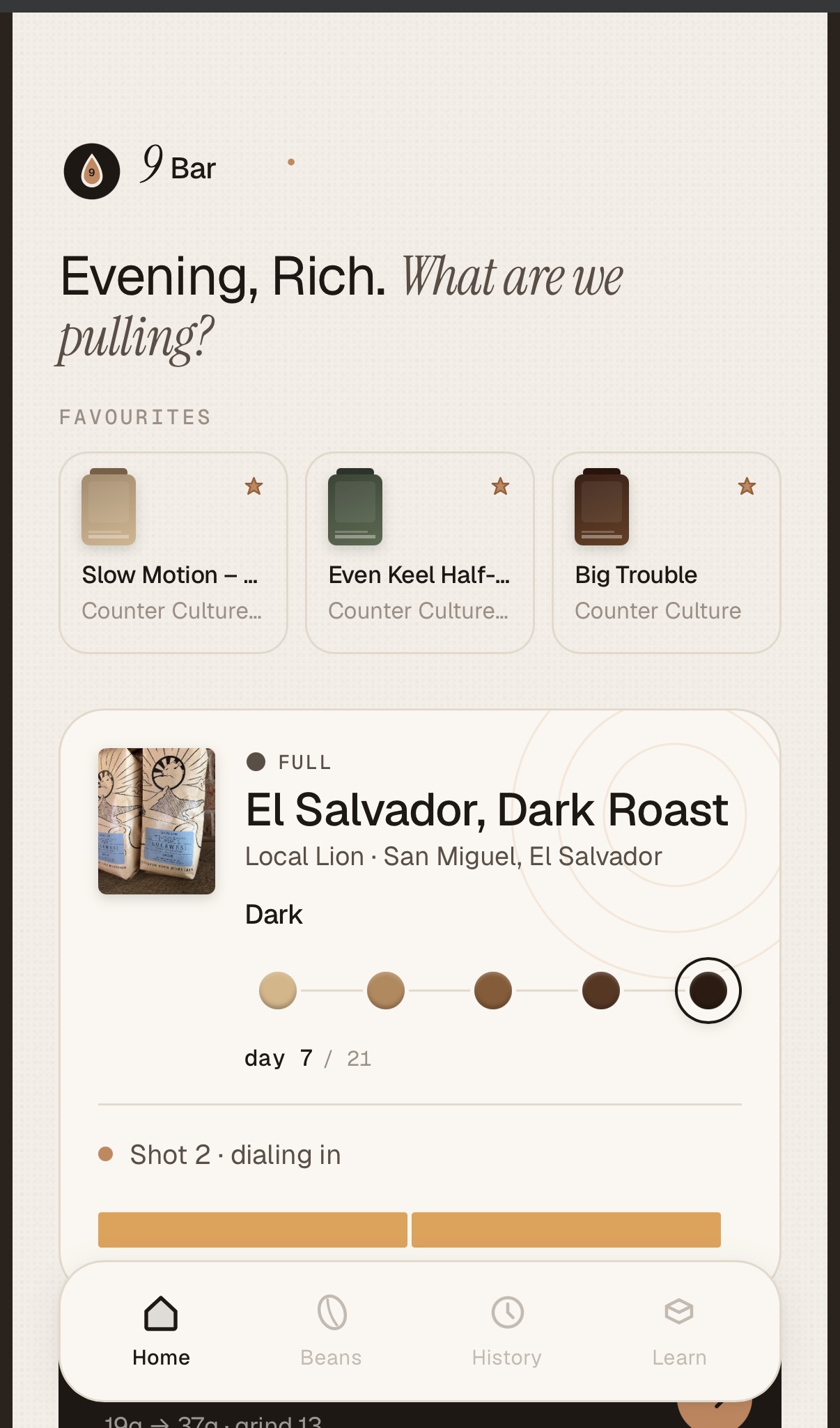
ScreenshotScreenshotScreenshot
After a few more weekend design and development sprints – I added a QR code scanner and URL scraper for adding new beans to my collection, created a flow for pulling shots and rating them and few other tweaks. Beta testing consists of pulling a morning shot using the app for a week then making changes the next weekend. I wish all beta testing tasted this good.
I’m now at the point where I think the app is actually useful and would like to share it with a few more people to get some feedback. If you are interested – leave a comment or drop me an email at sharps [AT] softwhere [DOT] org. It’s not a self contained iOS app (yet) and you need to be able to run the app on a desktop or laptop on your home network using npx (Node Package Execute) – if none of that means anything to you – you’ll need to wait a little longer for the native iOS app.
Some near term goals for the app :
Integrate it with the Half Descent Scale so the app can control the scale and also pull the timer and yield info straight into the app – I’m currently doing that manually
Re-order beans directly from the app.
Wrap or re-write the app so I can push it to the app store
Move the storage to the cloud so you can easily synch between devices
Why the cryptic name ? 9 bars of pressure is the gold standard for brewing authentic espresso.
Although I haven’t been a full-time developer for well over 25 years, most of my career in product leadership has been in support of people building, deploying, and managing software systems, so I’ve always maintained a close interest in the art and science of software. With only a few exceptions—pretty much every year for the last 25 – I’ve managed to find a reason to actually write some code. I’m a big fan of learning by doing.
The early AI augmented co-pilots were very useful for someone who, like me, is not a regular coder and doesn’t have the time to learn the latest language, framework, or stack. The first vibe coding platforms were even more useful—producing running prototypes from simple prompts but the tools quickly became confused after a few iterations.
In the last 6 months, though—I feel like we’ve hit a significant step change in capability. On rainy Memorial weekend this year, I jumped into full AI development using Claude Design/Code, and I am pretty blown away with the speed and results.
Over the last 3 days, I developed two non-trivial apps—both of which would’ve taken me months to hand-code. Note in aggregate – I suspect I only spent about 5 or 6 hours actually developing software.
The work-related app
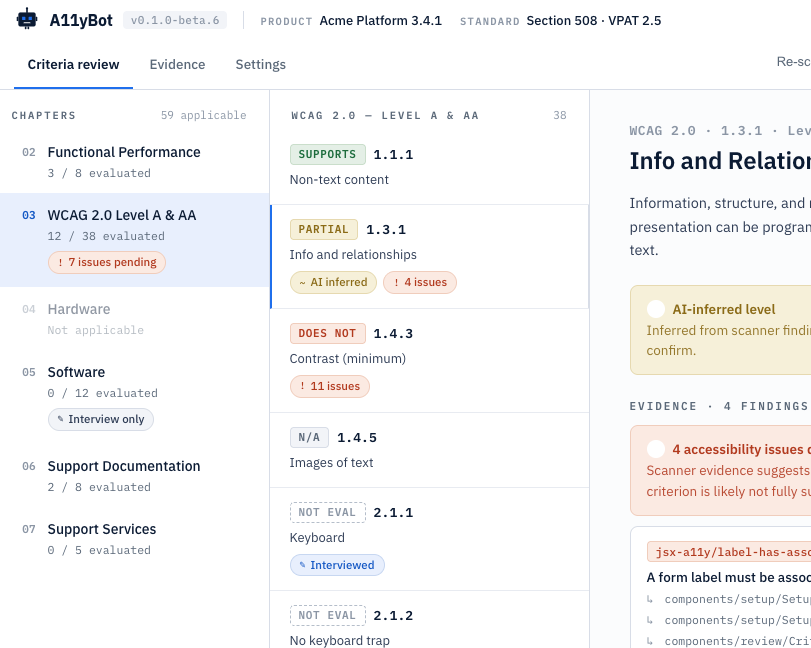
This first (A11yBot) is a web-based tool for completing Accessibility documentation (aka VPATs)—something most government customers require but part of the “whole product” that is usually de-prioritized. Yes, there are commercial apps, open-source apps and even commercial services for producing A11y report – but that’s not really the point – it’s a rich enough space to make a good target app.
A11yBot Design
The A11yBot app runs locally, scans source code and a running web apps, and produces a VPAT report covering the standards you have selected. AI-generated responses synthesize the evidence from scans and completes the report. It supports the major Accessibility standards in the US and internationally. You can plug in an LLM for the AI response generation using OpenRouter or hook up to local models using Ollama APIs.
For this app – I started with a two-page-long specification outlining the MVP, goals (as automated as possible), and constraints (easy to run locally). From that, I asked Claude to produce a design – schema, workflow, and technology stack. Got the first working release in about 30 minutes and pushed it to GitHub as a baseline.
Running local models, scanners, test environment, and builds on a 24Gb M5 MacBook doesn’t work well, so I invested time in using the remote option in Claude Code so everything is running on a bigger Mac mini in my office. I have a suspicion that Claude leaks Chrome helpers as well – ended up with hundreds consuming about 70Mb each. Reboot time.
I also spent time trying different local models (via Ollama) for the report generation, then had Claude implement an OpenRouter API so I could use larger text models – huge improvement in speed and quality. Tldr – the big hosted models are a) much faster; b) produce much better outputs. You pay for what you get.
After several iterations – the app functioned well but looked like crap, so I opened Claude Design, asked it to do a design review (just needs access to code), and then to come up with a better design. Also added a dark mode switcher and took care of some outstanding A11y issues. It took about three more sprints (maybe 2 hours in total) to get all this work done, which required some restructuring and updates to the underlying data model, but this phase truly left me impressed. I realize Claude Design is still new, but it can already do some impressive work – I need to invest more time. Once Claude Design is fully integrated with Claude Code – it will be incredible – for now you just have to copy whole design briefs over and have Claude Code ingest them.
The A11yBot project is available on GitHub under – feel free to take it for a spin. If enough people are interested – I’ll invest more time in it and push it to npmjs to make it even simpler to run and probably license it under ASL2.0. Likewise – if anyone wants to improve on it – bring your robots !
The lifestyle app
The next app came off the long list of apps that I wish existed. I’m a bit of a home Espresso aficionado and go through a manual process of dialing new beans (dose, grind, extraction time, etc.) – the science/logic is well established, but I’ve never seen a decent application to make it easier.
9Bar Design
Unlike the first app, I had a very good sense of how the app should behave, so I started in Claude Design (oops, ran out of credits) rather than diving straight into code gen. I started with a one-page specification describing the manual workflow and form factor – iPads, iPhone, and the areas I thought could be improved with an app.
MVP is:
loading a new bean – scans QR code and pulls details from the roasters’ website, or you can enter details manually.
Maintaining your Bean database (hopefully with the perfect extraction parameters).
Running an extraction, recording parameters like dose, grind, time, etc.
Taking user input on taste and giving advice on how to improve the next extraction.
I handed over the Design spec to Claude Code – asked it to come up with a schema and technical design and then let Claude go in full auto mode (oops, out of credits again).
I had to do a fair amount of debugging and research with this one (maybe 30 – 60 mins.) – especially the QR code reader. And I had to do two extra test shots to get the flow right – buzz!. I’m not making this repo public for now – need to iterate on it some more but may share it in the future. I also think this App will scale up well – the more people use it the more data on perfect extractions will be available without the need for experimentation.
Lessons Learned
A few things I’ve learned through this long weekend exercise:
For anything but minor fixes – do focused design / plan session – that gets you down to a very specific plan and goes much quicker
Maintain a regression suite. After major revisions, ask Claude to update regressions tests – I mostly do this for the data layer and APIs. Also, have some baseline reports to black box test end to end.
As long as I’m working on my own, I’m just working on the main branch though I’ve used feature branches for more speculative / risky stuff. Right now, I’m just letting Claude deal with GitHub.
Experiment in branches – code is now cheap – if the change doesn’t work, abandon the branch.
To do any kind of development, you need a $200 / month plan – I’m guessing full time devs are burning through $1000’s a month ??
Ask Claude to delegate visual testing back to you – watching Claude do testing via Chrome with screenshots is painful and very slow and no doubt burns tokens
Cost aside – code is cheap. I did start logging issues in GitHub for future work but quickly realized it takes only a little more (of my time) to ask Claude to code it.
If you have multiple machines – there are various ways you can leverage them – I’m using SSH to run stuff on my Mac mini while working on my laptop.
I find working in focussed sprints much quicker and less likely to exhaust / pollute the context window (mine and Claude’s!).
Batch up small fixes into a single prompt. This fits with how I work – I’ll run through the flow and make notes then ask Claude to fix them before the next iteration. Bigger stuff goes into a separate sprint.
Use /clear regularly – I use /clear as a matter of course when I’m starting a new “sprint”
The collapsed feedback loop is a true game changer – you can sit down with a user (myself included, in this case) and iterate in real time.
I’ve become acutely aware of token costs and have already started reading tips on token frugality.
Note – I’ve used the word sprint here – to me that’s a focussed batch of work with some outcome but instead of taking 2-3 weeks – it takes between 5 and 15 minutes with Claude.
In a previous life, I was a developer for about a decade – Assembly, C / C++, Fortran, Smalltalk, Java, I used to love developing software – you get a real sense of accomplishment but I never had the patience for the yak-shaving, obscure language syntax or arcane behaviors of someone else’s framework. Removing coding tasks from software development has been a dream for decades but we’re getting dangerously close to finally achieving it IMO.
I’ve been a happy, occasional WordPress user since 2008 – this blog is hosted by Automattic – I pay them money even though there are cheaper ways to host a low-volume WP site. I’ve even had the pleasure of meeting Matt Mullenweg a couple of times over the years. I’ve seen WordPress the product and community grow to the point where it’s become the de-facto content management system for the modern web – powering 478 million site – 43% of the web.
The WordPress community has recently been thrust into the spotlight due to a public disagreement between the two major players: Automattic, led by WordPress co-founder Matt Mullenweg, and WP Engine, a popular WordPress hosting provider.
At the heart of the dispute are questions about contributions to the WordPress ecosystem, trademark usage, and the balance between commercial interests and open-source principles. Automattic has raised concerns about WP Engine’s level of contribution to WordPress development, while WP Engine maintains that its contributions are substantial and in line with industry norms.
The situation has escalated to legal actions, with both parties sending cease-and-desist letters and WP Engine filing a lawsuit against Automattic and Mullenweg. This conflict has led to technical disruptions, internal restructuring at Automattic (Matt offered employees a decent severance package to leave if they disagreed with his position), and broader discussions about governance in the WordPress community.
As the dispute unfolds, it highlights the complex relationships within open-source ecosystems, where commercial entities both benefit from and contribute to shared resources. The outcome of this situation may have far-reaching implications for how open-source projects, particularly WordPress, navigate the balance between community collaboration and commercial interests in the future.
For the record – I don’t like open source freeloading – especially when it’s large well funded organizations doing the exploitation. Open Source collaboration depends on a certain degree of fairness – contributors take out more than they put in and it’s a fine balance that’s easily disrupted should someone decide to not give at all.
That said – I think Matt Mullenweg / Automattic could and should have handled this much better. If you are the dominant force in a community (as Automattic is in the WordPress community) and can’t defend yourself from freeloaders – you are doing something very wrong. If you control the code – there are thousands of tweaks you can make to the release model, cadence, APIs, to advantage you and disadvantage others. We lived this every day at Red Hat – it can be done without cease and desist notices, laying off employees who disagree with you and fracturing the community.
If you know anything about me, you know the two things that test my resistance are bike shops and the Apple stores. So, over the weekend, I found myself in the local Apple store and chatted with the guy serving me. The discussion led to the Vision Pro. With a bit of time on my hands, I agreed to a quick 15-minute demo.
I wear progressive lenses with a pretty complex prescription, so the first potential hurdle was getting the optical inserts set up and whether they would even support my prescription. Apple has an in-store machine that will measure your existing eyewear, so you don’t need to have your prescription details. That worked incredibly quickly, and the store will even mail you the settings for later use.
The headset is quite a bit smaller and lighter than I expected – I have owned the last few iterations of the Meta headset, and they’re much bigger. The device feels well-engineered, and the materials feel the quality you’d expect on a $3500 device.
I only had a quick 15-minute scripted demo, so I didn’t have much time for free play, but here are the things that really jumped out at me.
Ergonomics – It may help that I’m a long-time Apple user, but the user interface felt incredibly natural – after just the briefest of explanations, I could open, close, move, resize windows, zoom, and scroll. This in itself is incredible for a couple of reasons:
There are no hand controllers – you just use your eyes to select things on the screen and your fingers to perform operations
The accuracy is pretty impressive, considering what is going on here.
With one exception – you have to use the watch-like bezel on the headset for specific operations – there has to be a good reason for this departure from the hand gesture UI – I just can’t think what it is.
Video and audio quality – the regular UI is really nice – if you’re used to having one or more big curved monitors on your desk – you will be at home. Where things get really amazing is the 3-D immersive video. The demo movies were on par with a recent trip to the Sphere in Las Vegas – parts of your brain really are tricked into thinking that you are there, inside the movie. There were a couple of demos of sports games. I think this could be an opportunity for Apple – for the real sports aficionado – the sticker price probably won’t be a significant obstacle – I just don’t know how many broadcasts take advantage of the technology today – if the EPL gets on board. I will have to take a second look! Watching regular TV and movies – I’m less certain about that – those things are relatively social activities and I can’t imagine households buying multiple headsets.
For me, the question remains—would I buy it, and more importantly, would I use it? The short answers are —no, I didn’t buy one, and no, I don’t think I would use it. I can say this with some certainty as I bought the last couple of iterations of the Meta headsets and stopped using them after about a month.
The longer answer is less certain. I’d love a more extended session with a keyboard and mouse pad and determine if it could be used for work. My current office setup is nice, and the cost easily exceeds the price of a Vision Pro. The problem with the work use cases is that Apple really caters to creative workers – designers and developers – both need decent power on their desktops. The Pro is M2 powered but specced like a mid-range laptop – if you are doing builds, video encoding, etc., that probably isn’t going to be enough given the horsepower needed to deliver the Pro UX. So you’re likely going to have your regular laptop/desktop and use the Vision as the display – that is currently supported, but I didn’t play with that feature – I think that could be pretty neat. I have a few Apple (and other) machines in my office and use virtual displays regularly.
I think AR/VR’s time will come as the technology evolves and the use cases and killer applications become more apparent. What we see with the first version of Vision Pro and Meta’s latest offering are incremental steps in a revolution in human/computer interaction. I’m looking forward to a longer demo and to see what version 2.0 looks like.
Yesterday’s decoder episode is an interview with Eugen Rochko, the author and BDFL of Mastadon – the crowd-funded, open source decentralized social network that many Twitter users are moving to (myself included).
At its core, it’s a pretty standard story of an open source project disrupting a multi-billion dollar market with large, well-funded incumbents. The wrinkle in this story is that the primary incumbent is struggling to align to a massive overvaluation and is run by the world’s richest person – Elon Musk.
The next chapter of the Mastodon story is about commercial sustainability as it scales. I’m assuming that there will be new rounds of growth fueled by Elon Musk’s efforts to monetize the huge Twitter install base. The impending blue check mark sign-up deadline will likely cause another Twitter diaspora, and Twitter seems to be in a tailspin.
Rochko and the Mastodon ecosystem face some challenges – on the one hand, they have to ensure no single vendor dominates the fediverse. Conversely, the BDFL model provides the focus and direction many open source projects lack. And typically – a BDFL model requires a dominant vendor to guide the development and roadmap to fit the market need. Without a balanced ecosystem, we’re back to where we are today.
The challenge for incumbents is whether they can afford to ignore the unifying standards behind the fediverse (e.g., ActivityPub) and whether they have enough user affinity to avoid users taking their content and social graphs elsewhere.
It’s going to be interesting to see how this plays out.
Without interoperability, there is no #metaverse. Without open standards and open source and the resulting interoperability – there would be no Web or Internet as we know them today. It is no accident that the characters comprising this post are readable in any browser on any device and have been transported across the global network through various switches, routers, and proxies manufactured by different vendors. The reader doesn’t have to care or know which tool I used to create this post, nor which character encoding or font I prefer – that is all transparent to the user because of open standards like HTML, CSS, HTTP, and TCP/IP.
As the web evolves – standardization and interoperability will play an increasingly important role. The Metaverse is more ambitious than the current web regarding the sheer amount of technology involved. The Metaverse is an amalgamation of technologies from gaming, film, AR/VR, AI/ML, commerce, etc. Some of these areas have established standards; others are still nascent.
One of the critical areas of interop (according to a poll at the Metaverse Standards Forum) is the exchange of assets. This is required for seamless commerce, moving digital goods between assets, and choosing different tools at the design stage. Designers also need the ability to import assets into a virtual world from a film or game studio or real world without losing fidelity.
There are already two major standards in this area – USD (Universal Scene Description) – first developed by Pixar and open-sourced in 2016. Today it enjoys strong support from Autodesk, Apple, NVIDIA, and the open source blender 3D graphics application. NVIDIA goes as far as claiming that USD is the HTML of the Metaverse – more here.
If USD is the HTML for the Metaverse, then maybe the other standard – glTF (GL Transmission Format) is what JPEG is for the Web and Mobile today. glTF is a lightweight file format for describing 3D scenes and models and is widely supported by @Microsoft, Meta/Occulus, and Unreal Engine.
Each standard has its benefits and supporting ecosystem, and it may not be possible or necessary to arrive at a single standard to meet all needs. Queue joke about the need for a 3rd standard to rule them all!
What this illustrates is that for something as central as being able to describe a 3D scene or object – the Metaverse will likely have to support (at least) two significant standards along with the overhead and complexity of versioning, converters, extensions, importers, and translators to ensure assets can be moved between ecosystems without exposing the problem to end users.
The efficient and seamless interchange of 3D assets is just the tip of the iceberg, and interoperability in many other areas (security, identity, money, reputation) will have to be addressed before the Metaverse becomes a reality.