The Casual Coder
This was cross posted from Linked.
Although I haven’t been a full-time developer for well over 25 years, most of my career in product leadership has been in support of people building, deploying, and managing software systems, so I’ve always maintained a close interest in the art and science of software. With only a few exceptions—pretty much every year for the last 25 – I’ve managed to find a reason to actually write some code. I’m a big fan of learning by doing.
The early AI augmented co-pilots were very useful for someone who, like me, is not a regular coder and doesn’t have the time to learn the latest language, framework, or stack. The first vibe coding platforms were even more useful—producing running prototypes from simple prompts but the tools quickly became confused after a few iterations.
In the last 6 months, though—I feel like we’ve hit a significant step change in capability. On rainy Memorial weekend this year, I jumped into full AI development using Claude Design/Code, and I am pretty blown away with the speed and results.
Over the last 3 days, I developed two non-trivial apps—both of which would’ve taken me months to hand-code. Note in aggregate – I suspect I only spent about 5 or 6 hours actually developing software.
The work-related app
This first (A11yBot) is a web-based tool for completing Accessibility documentation (aka VPATs)—something most government customers require but part of the “whole product” that is usually de-prioritized. Yes, there are commercial apps, open-source apps and even commercial services for producing A11y report – but that’s not really the point – it’s a rich enough space to make a good target app.
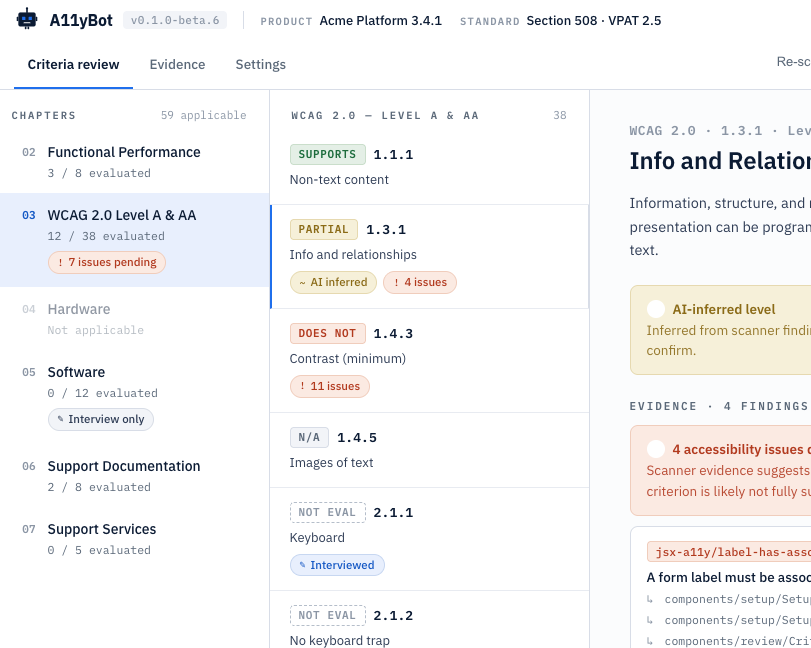
The A11yBot app runs locally, scans source code and a running web apps, and produces a VPAT report covering the standards you have selected. AI-generated responses synthesize the evidence from scans and completes the report. It supports the major Accessibility standards in the US and internationally. You can plug in an LLM for the AI response generation using OpenRouter or hook up to local models using Ollama APIs.
For this app – I started with a two-page-long specification outlining the MVP, goals (as automated as possible), and constraints (easy to run locally). From that, I asked Claude to produce a design – schema, workflow, and technology stack. Got the first working release in about 30 minutes and pushed it to GitHub as a baseline.
Running local models, scanners, test environment, and builds on a 24Gb M5 MacBook doesn’t work well, so I invested time in using the remote option in Claude Code so everything is running on a bigger Mac mini in my office. I have a suspicion that Claude leaks Chrome helpers as well – ended up with hundreds consuming about 70Mb each. Reboot time.
I also spent time trying different local models (via Ollama) for the report generation, then had Claude implement an OpenRouter API so I could use larger text models – huge improvement in speed and quality. Tldr – the big hosted models are a) much faster; b) produce much better outputs. You pay for what you get.
After several iterations – the app functioned well but looked like crap, so I opened Claude Design, asked it to do a design review (just needs access to code), and then to come up with a better design. Also added a dark mode switcher and took care of some outstanding A11y issues. It took about three more sprints (maybe 2 hours in total) to get all this work done, which required some restructuring and updates to the underlying data model, but this phase truly left me impressed. I realize Claude Design is still new, but it can already do some impressive work – I need to invest more time. Once Claude Design is fully integrated with Claude Code – it will be incredible – for now you just have to copy whole design briefs over and have Claude Code ingest them.
The A11yBot project is available on GitHub under – feel free to take it for a spin. If enough people are interested – I’ll invest more time in it and push it to npmjs to make it even simpler to run and probably license it under ASL2.0. Likewise – if anyone wants to improve on it – bring your robots !
The lifestyle app
The next app came off the long list of apps that I wish existed. I’m a bit of a home Espresso aficionado and go through a manual process of dialing new beans (dose, grind, extraction time, etc.) – the science/logic is well established, but I’ve never seen a decent application to make it easier.
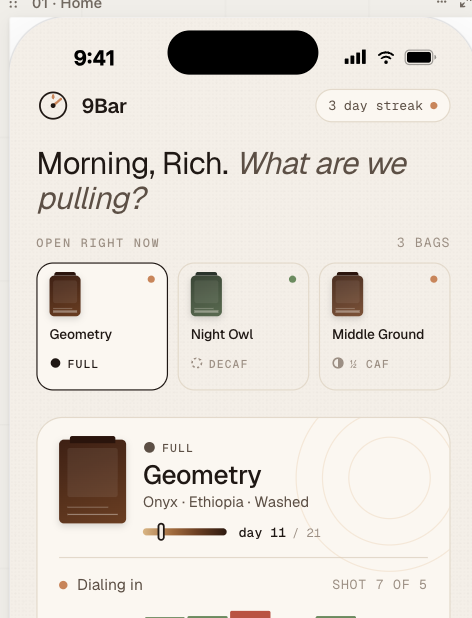
Unlike the first app, I had a very good sense of how the app should behave, so I started in Claude Design (oops, ran out of credits) rather than diving straight into code gen. I started with a one-page specification describing the manual workflow and form factor – iPads, iPhone, and the areas I thought could be improved with an app.
MVP is:
- loading a new bean – scans QR code and pulls details from the roasters’ website, or you can enter details manually.
- Maintaining your Bean database (hopefully with the perfect extraction parameters).
- Running an extraction, recording parameters like dose, grind, time, etc.
- Taking user input on taste and giving advice on how to improve the next extraction.
I handed over the Design spec to Claude Code – asked it to come up with a schema and technical design and then let Claude go in full auto mode (oops, out of credits again).
I had to do a fair amount of debugging and research with this one (maybe 30 – 60 mins.) – especially the QR code reader. And I had to do two extra test shots to get the flow right – buzz!. I’m not making this repo public for now – need to iterate on it some more but may share it in the future. I also think this App will scale up well – the more people use it the more data on perfect extractions will be available without the need for experimentation.
Lessons Learned
A few things I’ve learned through this long weekend exercise:
- For anything but minor fixes – do focused design / plan session – that gets you down to a very specific plan and goes much quicker
- Maintain a regression suite. After major revisions, ask Claude to update regressions tests – I mostly do this for the data layer and APIs. Also, have some baseline reports to black box test end to end.
- As long as I’m working on my own, I’m just working on the main branch though I’ve used feature branches for more speculative / risky stuff. Right now, I’m just letting Claude deal with GitHub.
- Experiment in branches – code is now cheap – if the change doesn’t work, abandon the branch.
- To do any kind of development, you need a $200 / month plan – I’m guessing full time devs are burning through $1000’s a month ??
- Ask Claude to delegate visual testing back to you – watching Claude do testing via Chrome with screenshots is painful and very slow and no doubt burns tokens
- Cost aside – code is cheap. I did start logging issues in GitHub for future work but quickly realized it takes only a little more (of my time) to ask Claude to code it.
- If you have multiple machines – there are various ways you can leverage them – I’m using SSH to run stuff on my Mac mini while working on my laptop.
- I find working in focussed sprints much quicker and less likely to exhaust / pollute the context window (mine and Claude’s!).
- Batch up small fixes into a single prompt. This fits with how I work – I’ll run through the flow and make notes then ask Claude to fix them before the next iteration. Bigger stuff goes into a separate sprint.
- Use /clear regularly – I use /clear as a matter of course when I’m starting a new “sprint”
- The collapsed feedback loop is a true game changer – you can sit down with a user (myself included, in this case) and iterate in real time.
- I’ve become acutely aware of token costs and have already started reading tips on token frugality.
Note – I’ve used the word sprint here – to me that’s a focussed batch of work with some outcome but instead of taking 2-3 weeks – it takes between 5 and 15 minutes with Claude.
In a previous life, I was a developer for about a decade – Assembly, C / C++, Fortran, Smalltalk, Java, I used to love developing software – you get a real sense of accomplishment but I never had the patience for the yak-shaving, obscure language syntax or arcane behaviors of someone else’s framework. Removing coding tasks from software development has been a dream for decades but we’re getting dangerously close to finally achieving it IMO.

 Rich Sharples' Weblog